[프롬프트 엔지니어링] 개발
개발 진행
[프롬프트 엔지니어링] 개발
개발
- EducationContentController
1
2
3
4
5
6
7
8
9
10
11
12
13
14
15
16
17
18
19
20
21
22
23
24
25
26
27
28
29
30
31
32
33
34
35
36
37
38
39
40
41
42
43
44
45
46
47
48
49
 @GetMapping("/")
 @Transactional
 @Operation(
         summary = "get education Content",
         security = @SecurityRequirement(name = SECURITY_SCHEME_NAME),
         responses = {
                 @ApiResponse(
                         responseCode = "200",
                         description = "Successful operation",
                         content = @Content(
                                 mediaType = "application/json",
                                 schema = @Schema(implementation = SuccessResponse.class)
                         )
                 ),
                 @ApiResponse(
                         responseCode = "400",
                         description = "Bad request",
                         content = @Content(
                                 mediaType = MediaType.APPLICATION_JSON_VALUE,
                                 schema = @Schema(implementation = ErrorResponse.class)
                         )
                 ),
                 @ApiResponse(
                         responseCode = "401",
                         description = "Bad credentials",
                         content = @Content(
                                 mediaType = MediaType.APPLICATION_JSON_VALUE,
                                 schema = @Schema(implementation = ErrorResponse.class)
                         )
                 )
         }
 )
 public ResponseEntity<?> educationContent(@ModelAttribute GetEducationContentRequest request) throws JsonProcessingException {
     long id = Long.parseLong(request.getEducationContentId());
     EducationContentDTO dto = educationContentService.findById(id);

     if(dto == null){
         ErrorResponse errorResponse = ErrorResponse.builder()
                 .message("The requested content does not exist.")
                 .build();
         return ResponseEntity.badRequest().body(errorResponse);
     }

     ObjectMapper mapper = new ObjectMapper();
     mapper.registerModule(new JavaTimeModule());
     mapper.disable(SerializationFeature.WRITE_DATES_AS_TIMESTAMPS);

     return ResponseEntity.ok().body(mapper.writeValueAsString(dto));
 }
1
2
   - 교육용 컨텐츠의 id를 받아서, 해당되는 컨텐츠의 정보를 제공하는 메소드이다.
   - ```security = @SecurityRequirement(name = SECURITY_SCHEME_NAME)``` 을 추가하여, authentication이 존재할 때만 해당 메소드를 실행할 수 있도록 만들었다.
- CommandLineRunner
CommandLineRunner는 Spring Boot에서 애플리케이션이 시작될 때 특정 로직을 실행할 수 있도록 해주는 인터페이스이다. 이 인터페이스는 단순히 run이라는 하나의 메서드를 가지고 있으며, 이 메서드는 애플리케이션이 완전히 시작된 후 호출된다.
1
2
3
4
5
6
7
8
9
10
11
12
13
14
15
16
17
18
19
20
    @Override
    public void run(String... args) throws Exception {
        if (educationContentService.count() == 0) {
            log.info("Creating education content...");
            createEducationConetent();
            log.info("education content created.");
        }
    }

    private void createEducationConetent() {
        EducationContentDTO educationContentDTO = EducationContentDTO.builder()
                .contents("더미 컨텐츠")
                .title("Zero-Shot Prompting")
                .subject("Techniques")
                .createdAt(LocalDateTime.parse("2024-04-15T10:15:30"))
                .updatedAt(LocalDateTime.parse("2024-04-15T10:15:30"))
                .build();

        educationContentService.save(educationContentDTO);
    }
- 애플리케이션이 실행된 다음에 Dummy 데이터를 DB에 저장한다.
- 테스트 용으로 사용할 때 편리하다.
- Comment (댓글) 관련 클래스
- Comment, CommentRepository, CommentService
1
2
3
4
5
6
7
8
9
10
11
12
13
14
15
16
17
18
19
20
21
22
23
24
25
26
27
28
29
30
31
32
33
34
35
36
37
38
39
40
41
42
43
44
45
46
47
48
49
50
51
52
53
54
55
56
@Entity
@Getter
@Table(name = "comment")
public class Comment {
    @Id
    @Column(name = "comment_id")
    @GeneratedValue(strategy = GenerationType.IDENTITY)
    @JsonManagedReference
    Long commentId;

    @ManyToOne(fetch = FetchType.LAZY)
    @JoinColumn(name = "user_id", referencedColumnName = "id")
    @JsonIgnore
    User user;

    @ManyToOne(fetch = FetchType.LAZY)
    @JoinColumn(name = "education_content_id", referencedColumnName = "content_id")
    @JsonIgnore
    EducationContent educationContent;

    @ManyToOne(fetch = FetchType.LAZY)
    @JoinColumn(name="parent_comment_id", referencedColumnName = "comment_id")
    Comment parentComment;

    @OneToMany(mappedBy = "parentComment", cascade = CascadeType.ALL)
    @JsonBackReference
    List<Comment> childCommentsList = new ArrayList<>();

    @Column(name = "body")
    String body;

    @Column(name = "created_at")
    LocalDateTime createdAt;

    @Column(name = "modified_at")
    LocalDateTime modifiedAt;

    @Builder
    public Comment(Long commentId, User user, EducationContent educationContent, Comment parentComment, List<Comment> childCommentsList, String body, LocalDateTime createdAt, LocalDateTime modifiedAt) {
        this.commentId = commentId;
        this.user = user;
        this.educationContent = educationContent;
        this.parentComment = parentComment;
        this.childCommentsList = childCommentsList;
        this.body = body;
        this.createdAt = createdAt;
        this.modifiedAt = modifiedAt;
    }

    public void addChildComment(Comment childComment){
        childCommentsList.add(childComment);
        childComment.parentComment = this;
    }

    public Comment() { }
}
- users 테이블, education-content 테이블, comment 테이블(자기 자신)과 연관관계 매핑이 되어있다.
- ParentComment는 자기 자신을 참조하는 필드이다. 부모 댓글을 의미한다.
- childCommentsList는 자식 댓글(대댓글)의 리스트를 의미한다.
- 댓글 달기 기능
1
2
3
4
5
6
7
8
9
10
11
12
13
14
15
16
17
18
19
20
21
22
23
24
25
26
27
28
29
30
31
32
33
34
35
36
37
38
39
40
41
42
43
44
45
46
47
48
49
50
51
52
53
54
55
56
57
58
59
60
61
    @PostMapping("/{educationContentId}/new-comment")
    @Operation(
            summary = "post new comment to a specific Education Content",
            security = @SecurityRequirement(name = SECURITY_SCHEME_NAME),
            responses = {
                    @ApiResponse(
                            responseCode = "200",
                            description = "Successful operation",
                            content = @Content(
                                    mediaType = "application/json",
                                    schema = @Schema(implementation = SuccessResponse.class)
                            )
                    ),
                    @ApiResponse(
                            responseCode = "400",
                            description = "Bad request",
                            content = @Content(
                                    mediaType = MediaType.APPLICATION_JSON_VALUE,
                                    schema = @Schema(implementation = ErrorResponse.class)
                            )
                    ),
                    @ApiResponse(
                            responseCode = "401",
                            description = "Bad credentials",
                            content = @Content(
                                    mediaType = MediaType.APPLICATION_JSON_VALUE,
                                    schema = @Schema(implementation = ErrorResponse.class)
                            )
                    )
            }
    )
    public ResponseEntity<CommentDTO> newComment(
            @PathVariable("educationContentId") String educationContentId,
            @RequestBody CommentRequest request ) {
        DateTimeFormatter formatter = DateTimeFormatter.ofPattern("yyyyMMdd'T'HH:mm:ss");

        CommentDTO dto = CommentDTO.builder()
                .educationContentId(Long.valueOf(educationContentId))
                .userId(UUID.fromString(request.getUserId()))
                .parentCommentId(Long.valueOf(request.getParentCommentId()))
                .body(request.getBody())
                .createdAt(LocalDateTime.parse(request.getCreatedAt(), formatter))
                .modifiedAt(LocalDateTime.parse(request.getModifiedAt(), formatter))
                .childCommentsIdList(null)
                .build();

        Long savedCommentId = commentService.save(dto);

        if(Long.valueOf(request.getParentCommentId()) != -1){
            // 대댓글안 경우, parent Comment에 자식 comment가 달렸음을 알려줘야 함.
            // 부모 Comment의 childCommentList에 새로운 노드 추가

            Long parentCommentId = dto.getParentCommentId(); // 기존에 존재하던 댓글 id
            Long childCommentId = savedCommentId; // 새로 추가된 대댓글 id

            commentService.updateChildCommentsList(parentCommentId, childCommentId);
        }

        dto.setCommentId(savedCommentId);
        return ResponseEntity.ok().body(dto);
    }
- 일단 댓글에 관련한 정보를 사용자에게 받는다.
- user id
- 교육용 콘텐츠 id
- 부모 댓글의 id
- 내용
- 생성시간, 수정시간
-
댓글을 작성할 때, 자식 댓글은 없는 상태이므로 null 값을 삽입한다.
- 만약, 부모 댓글이 존재하는 경우 (대댓글인 경우), 해당 부모 댓글의 childCommentsList에 새로운 자식을 추가해주어야 한다.
오류
1. PersistentBag
PersistentBag는 Hibernate에서 컬렉션을 관리하기 위해 사용하는 클래스 중 하나이다.
Hibernate는 JPA 구현체로서, 엔티티 간의 관계를 관리하기 위해 여러 가지 컬렉션 타입을 제공한다. PersistentBag은 그 중 하나로, 주로 java.util.List를 구현한다.
1
2
    @OneToMany(mappedBy = "educationContent")
    private ArrayList<Comment> commentList = new ArrayList<>();
ArrayList는 PersistentBag이 관리하지 않는다. 따라서, 다음과 같이 수정해야 한다.
---
#### 2. @JoingColumn @JoinColumn(name = "id") 주의 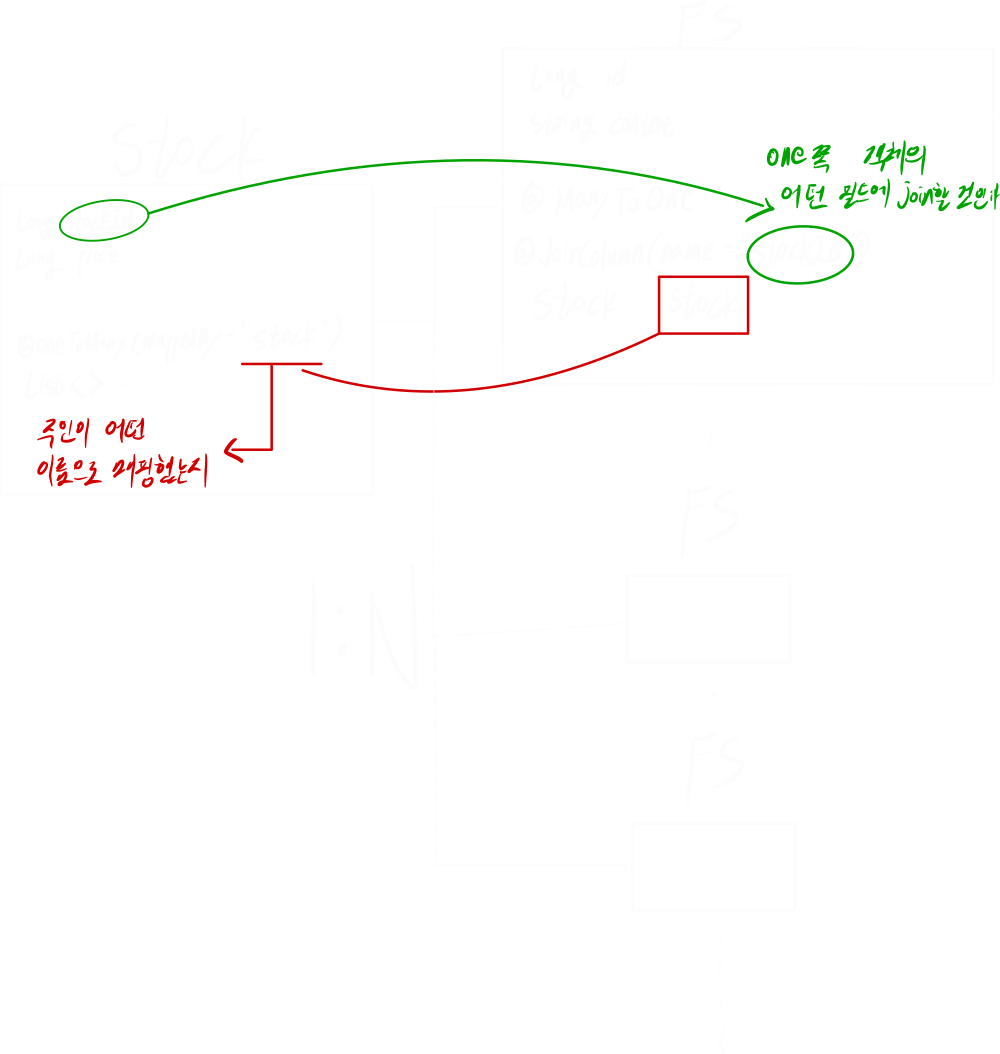 JoinColumn에서 외래키의 주인 쪽 컬럼 명과 매핑되는 쪽의 컬럼 명이 다르면 referencedColumnName 어노테이션을 사용해서 명시적으로 지정해야 된다.
---
#### 3. The given id must not be null 오류메시지: ```org.springframework.dao.InvalidDataAccessApiUsageException: The given id must not be null```
---
``` userRepository.findById(commentDTO.getUserId()).get() ``` ➜ ``` User user = userRepository.findById(commentDTO.getUserId()) .orElseThrow(() -> new IllegalArgumentException("Invalid user ID")); ``` 왜 그런건지 공부 필요
---
#### 4. LazyInitializationException >```org.hibernate.LazyInitializationException```는 영속성 컨텍스트가 종료되어 버려서, 지연 로딩을 할 수 없어서 발생하는 오류이다. <해결> ```@Transactional``` 을 컨트롤러의 메소드에 추가해주니 잘 실행되었다.
---
#### 5. mappingexception Docker 환경에서는 애플리케이션이 잘 돌아가는데, Local에서 돌리면 다음과 같은 오류가 발생했다. ``` org.springframework.data.mapping.mappingexception: parameter org.springframework.data.mapping.parameter@97b61336 does not have a name ```
<해결> 빌드 설정을 Intellij 에서 Gradle로 바꿔주니 잘 동작했다. 이러한 오류가 발생한 원인은 이 포스트에서 잘 설명해주셨다. >요약하자면, Spring 6.1 버전에서 ```LocalVariableTableParameterNameDiscoverer``` 라는 구현체가 삭제되었는데, Intellij에서 빌드할 때 사용하는 ```-g``` 옵션은 해당 구현체를 사용해서 파라미터의 이름을 가져온다. 따라서, Intellij에서 빌드하면 파라미터의 이름을 가져오지 못하는 MappingException이 발생했던 것이다.
---
#### 6. DTO -> JSON 순환참조 ``` Resolved [com.fasterxml.jackson.databind.JsonMappingException: Infinite recursion (StackOverflowError) (through reference chain: org.hibernate.collection.spi.PersistentSet[0]->com.cluster23.promptfordev.entity.User$HibernateProxy$j1Hdqelu["terms"]->org.hibernate.collection.spi.PersistentBag[0]->com.cluster23.promptfordev.entity.Term["users"] ```
<해결> 웬만하면 양방향 매핑을 사용하지 말자. ```@JsonIgnore``` 어노테이션을 사용해서 직렬화할 때 특정 필드를 무시하도록 만든다.
``` @ManyToOne(fetch = FetchType.LAZY) @JoinColumn(name = "user_id", referencedColumnName = "id") @JsonIgnore User user; ```
- User를 무시하게 만들면, 직렬화할 때 user 필드는 빠진다. - 이 때, user_id 라는 빼고 Json을 작성한다는 것이 아니다! >이 설정을 통해, user 객체는 JSON에 포함되지 않으며 user_id 필드만이 포함된다. 여기서 user_id는 데이터베이스의 comment 테이블에 실제로 존재하는 값이고, JSON으로 변환될 때 포함된다. 그러나 User 객체 자체, 즉 user_id가 참조하는 User 테이블의 다른 컬럼들(예: role, term 등)은 JSON으로 변환되지 않는다. 이는 user_id는 포함하지만, User 테이블의 내용을 직렬화하지 않는다는 것을 의미한다.
---
### JPA와 관계형 DB JPA와 관계형 DB의 연관관계를 잘못 이해했다. 대댓글 서비스를 만들던 중, 부모 댓글에 자식 댓글 목록을 추가하는 로직을 작성했다. 근데, 아무리 추가를 해도 Comment 테이블의 child_comments_list 컬럼에는 아무 정보도 작성되지 않았다. 당연한거다. childCommentsList 라는 필드는 양방향 연관관계 매핑을 위한 필드이다. 실제 Comment 테이블에는 존재하지 않는다. DB와 객체를 너무 똑같은 선상에서 생각을 했던 것 같다.
#### 대댓글 관련 의문점 객체지향과 DB를 혼동하고 있는 사람이라면, 필자와 같은 의문을 갖게 될지도 모른다. 객체지향과 DB를 정확히 알고있는 사람이라면, 위의 의문이 왜 생기는지 조차 이해할 수 없을 것이다.
```java @ManyToOne(fetch = FetchType.LAZY) @JoinColumn(name="parent_comment_id", referencedColumnName = "comment_id") Comment parentComment; @OneToMany(mappedBy = "parentComment", cascade = CascadeType.ALL) @JsonBackReference List
따라서, ```mappedBy = "commentId"``` 로 "현재 댓글"에 매핑되어야 한다고 생각했다. 근데 이것은 객체 지향적인 관점이다. DB의 관점에서 생각해보자. Team과 Member 테이블이 있을 때, Team A에 속한 member들을 조회하려면 어떻게 하는가? 모든 member 중 Team이 A인 것들을 찾는다. 위와 똑같이, 댓글 1번에 속한 대댓글들을 조회하려면 어떻게 해야 할까? 모든 Comment 중 ParentComment가 1인 것들을 찾는다. 따라서, ```mappedBy = "parentComment"```가 되어야 하는 것이다.
This post is licensed under
CC BY 4.0
by the author.